



QuickText
Your standard text,
inserted by name.
Everyone retypes the same few blocks of text all week. Your address. The reply you send when somebody asks for a quote. The setup steps you send every new starter. Save each one once, then say its name.
Say the name, get the block
The wording is flexible, and it works in the middle of a sentence as well as at the start of one, so you can talk straight through an insert without stopping.
- insert QuickText of my address
- your three-line address
- I'll send it to enter QuickText of the warehouse address today
- I'll send it to (the address) today
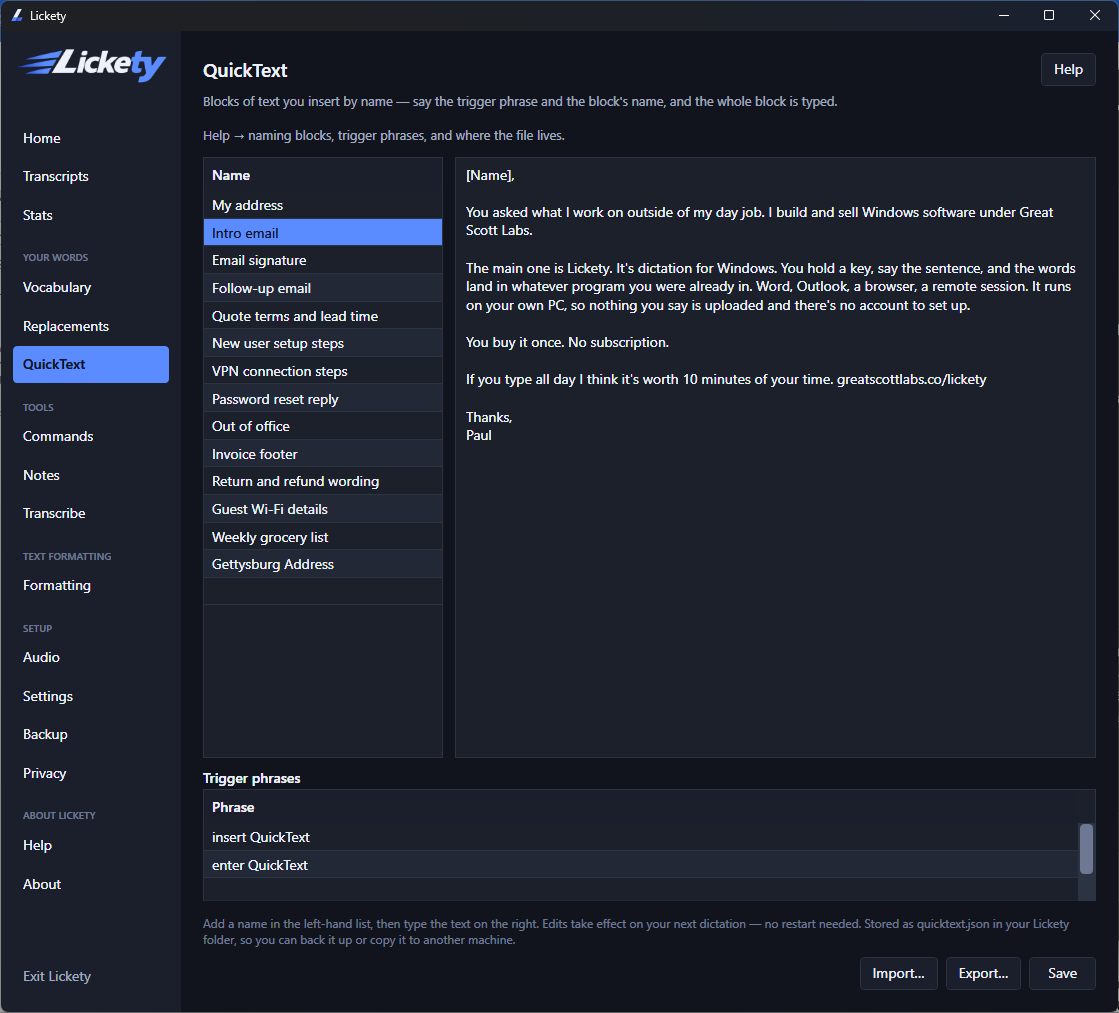
A block can be anything
There is no practical shape to it. A signature is three lines. A standard reply is a paragraph. A new-starter checklist is twenty. They are all the same thing to Lickety, and they are all stored in one file you can back up or carry to another machine.
Import and export
The blocks live in a plain file in your Lickety folder, so moving to a new PC is a copy rather than an afternoon. Edits take effect on your next dictation, with no restart.
Questions
Can I use it in the middle of a sentence?
Yes. Say the trigger phrase mid-sentence and the block drops in where you are, then carry on talking.
Where are the blocks kept?
In a file in your Lickety folder on your own PC. Back it up, or copy it to another machine.
Do I have to restart after editing one?
No. The change applies to your next dictation.
Lickety — $79, once
Windows 10 & 11. No account, no upload, nothing renews.